


After finding the suspicious artifact, we move on to Task 2. Unfortuately I do not feel like this task was well designed, but I’ll leave my rant to the end.
Task 2 - The hunt continues - (Network Forensics)
Description
With your help, the team concludes that there was clearly a sophisticated piece of malware installed on that endpoint that was generating some network traffic. Fortunately, DAFIN-SOC also has an IDS which retained the recent network traffic in this segment.
DAFIN-SOC has provided a PCAP to analyze. Thoroughly evaluate the PCAP to identify potential malicious activity.
Downloads:
- PCAP to analyze (traffic.pcap)
Prompt:
- Submit all the IP addresses that are assigned to the malicious device, one per line
We’re given quite a large PCAP file to analyze. There are 2344 packets total, with quite a bit of protocols.
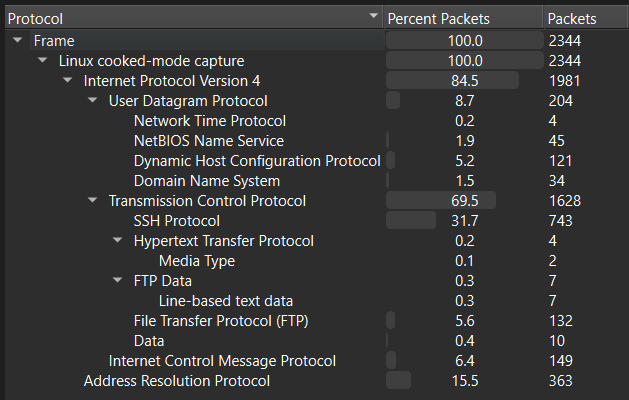
Most of the traffic is noise, but there are some interesting tidbits, such as FTP traffic being used to transfer files including 3 router configuration files and an RFC, some DNS traffic, an SSH session, and a weird TCP session that sends an RSA public key.
There are a lot of ways to begin approaching this, but my main breakthrough happened after finding the 3 router configs. They felt really suspicious to me, especially combined with the fact that we were meant to submit IP addresses assigned to a malicious device, something that these router configs would definitely have.
Here are the 3 configs:
config interface 'loopback'  option device 'lo'  option proto 'static'  option ipaddr '127.1.7.1'  option netmask '255.0.0.0'
config globals 'globals'  option ula_prefix 'fd10:95e0:f1b::/48'  option packet_steering '1'
config device  option name 'br-lan'  option type 'bridge'  list ports 'eth0'
config interface 'lan'  option device 'br-lan'  option proto 'static'  option ipaddr '192.168.1.254'  option netmask '255.255.255.0'  option ip6assign '60'
config interface 'to_devnet'  option proto 'static'  option device 'eth1'  option ipaddr '192.168.4.1'  option netmask '255.255.255.240'
config route  option interface 'lan'  option target '192.168.1.0/24'  option gateway '192.168.1.254'
config route 'to_lan2' option target '0.0.0.0/0' option gateway '192.168.4.2' option interface 'to_devnet'config interface 'loopback' option device 'lo' option proto 'static' option ipaddr '127.0.8.2' option netmask '255.0.0.0'
config globals 'globals' option ula_prefix 'fd45:7f60:3ad5::/48' option packet_steering '1'
config device option name 'br-lan' option type 'bridge' list ports 'eth0'
config interface 'lan' option device 'br-lan' option proto 'static' option ipaddr '192.168.2.254' option netmask '255.255.255.0'
config interface 'wan' option device 'eth1' option proto 'dhcp'
config interface 'to_devnet' option proto 'static' option device 'eth1' list ipaddr '172.16.1.254/24'
config interface 'to_lan1' option proto 'static' option device 'eth2' list ipaddr '192.168.4.2/28'
config interface 'to_lan3' option proto 'static' option device 'eth3' list ipaddr '192.168.5.2/28'
config interface 'to_host_nat' option proto 'dhcp' option device 'eth4'
config route 'route_to_devnet' option interface 'to_devnet' option target '172.16.1.0/24' option gateway '172.16.1.254'
config route option interface 'lan' option target '192.168.2.0/24' option gateway '192.168.2.254'
config route 'route_to_lan1' option target '192.168.1.0/24' option gateway '192.168.4.1' option interface 'to_lan1'
config route option target '192.168.3.0/24' option gateway '192.168.5.1' option interface 'to_lan3'config interface 'loopback' option device 'lo' option proto 'static' option ipaddr '127.4.1.3' option netmask '255.0.0.0'
config globals 'globals' option ula_prefix 'fdf2:87c7:eb73::/48' option packet_steering '1'
config device option name 'br-lan' option type 'bridge' list ports 'eth0'
config interface 'lan' option device 'br-lan' option proto 'static' option ipaddr '192.168.3.254' option netmask '255.255.255.0' option ip6assign '60'
config interface 'to_openwrt2' option device 'eth1' option proto 'static' list ipaddr '192.168.5.1/28'
config interface 'host_nat' option proto 'dhcp' option device 'eth2'
config route option target '192.168.3.0/24' option gateway '192.168.3.254' option interface 'lan'
config route option target '0.0.0.0/0' option gateway '192.168.5.2' option interface 'to_openwrt2'After filtering for only packets related to 192.168.[1,2,3].254, one thing I noticed was that they all have DNS requests to archive.ubuntu.com.
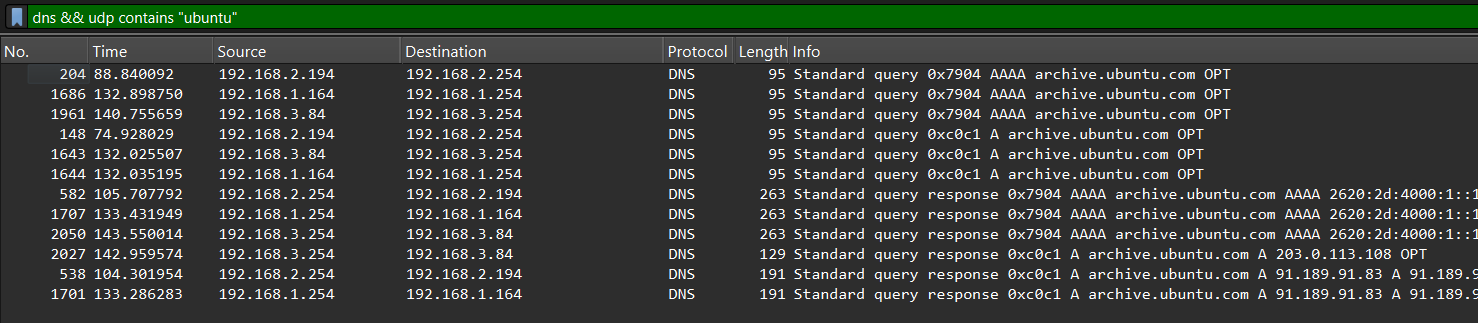
The response from the third router, 192.168.3.254, is suspicious, as it returns 203.0.113.108 as the query response, unlike the other two routers which return legitimate Ubuntu archive IPs. This IP address is in the TEST-NET-3 range, which is reserved for documentation and examples, meaning it is highly likely that this third router is the malicious device we are looking for.
Going back to the router configs, we can see that router 3 has these three configuration blocks, one for loopback, one for LAN, and one for to_openwrt2.
config interface 'loopback'  option device 'lo'  option proto 'static'  option ipaddr '127.4.1.3'  option netmask '255.0.0.0'
config interface 'lan'  option device 'br-lan'  option proto 'static'  option ipaddr '192.168.3.254'  option netmask '255.255.255.0'  option ip6assign '60'
config interface 'to_openwrt2'  option device 'eth1'  option proto 'static'  list ipaddr '192.168.5.1/28'
Together, we get the following IP addresses assigned to this device:
127.4.1.3192.168.3.254192.168.5.1
Which we can submit as our final answer.
rant
I’m just leaving this here as a note because I didn’t like the way this challenge was setup. I get the intent, especially with the shared DNS requests, but the description to “Submit all the IP addresses that are assigned to the malicious device, one per line” is very vague and open to interpretation. Additionally, if you submit a wrong answer, there’s no feedback at all on how you might have misinterpreted the prompt, which makes it very frustrating to try and figure out what the challenge creator intended, especially since Codebreaker as a whole is long term enough that you might come back weeks later, still have no idea what you did wrong, make a wrong guess, then get frustrated and leave again.
Also, if you miss the router configs, you’re essentially left with trying to take IPs from the PCAP itself and just hoping you get the right “malicious” ones. There’s a lot of other traffic that is potentially suspicious, but since it doesn’t come from the correct router specifically, it isn’t included. In my opinion, trimming some of the noise from the PCAP or having a slightly more descriptive prompt would have made this a lot better. Of course, I can see that the intent was to notice the router configs in the first place, which I agree makes sense and is a good skill to have, but there’s just so much to comb through that you might not notice them until cutting through a lot of other stuff first.
Overall it just seems really sloppy and untested, especially from something like NSA Codebreaker. Especially as early as task 2, it seems way too guessy to allow for decent progress for a large number of participants. The solve rate for this task shows this too (see here)